Key Takeaways
- Two Essential Apps Do It All: You only need WeChat or Alipay downloaded on your smartphone. These mega-apps host the restaurant mini-programs that handle menus, customization, and payments.
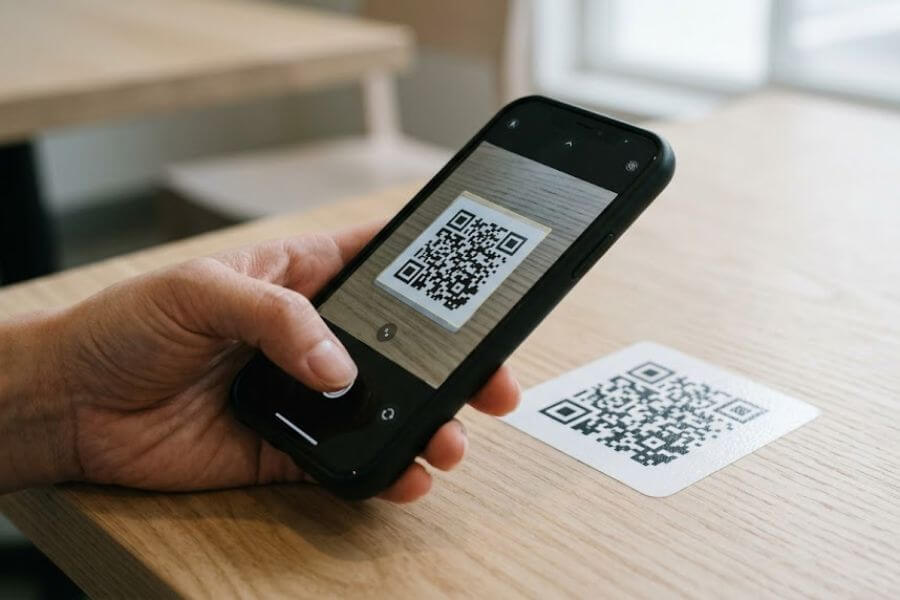
- Scan the Unique Table Barcode: Every dining table features its own distinct quick-response code. Scanning it links your specific table directly to the kitchen, automating the entire ordering process.
- Built-in Translation Software Saves the Day: You do not need to read Chinese characters. Both major payment apps offer built-in translation buttons that convert menus into English instantly.
- International Bank Cards Work Smoothly: You can link your home Visa or Mastercard directly to WeChat Pay or Alipay before your trip, allowing you to pay for your meals like a local.
- Zero Hostility Toward Foreigners: Digital ordering is completely self-service. It removes language barriers entirely, making it incredibly smooth for international travelers and younger tech-savvy diners.
The Digital Dining Revolution in China
Walking into a restaurant in China for the first time can feel like stepping onto a futuristic movie set. The classic scene of a waiter standing by your table with a paper notepad and a pen is almost completely gone. Instead, you will find vibrant dining rooms filled with people staring at their smartphones, tapping their screens, and waiting for steaming bowls of noodles or plates of dumplings to arrive.
This transformation relies on quick-response codes, commonly called QR codes, and mini-programs. Mini-programs are lightweight, built-in applications that run directly inside larger applications like WeChat and Alipay. They function like regular smartphone programs, but you do not need to download them from an app store. They launch instantly when you scan a barcode.
For a traveler, this digital shift is a massive advantage. You no longer have to worry about mispronouncing words or pointing blindly at a paper menu with zero photos. The system puts the entire restaurant experience right into your hands, letting you browse at your own speed, customize your ingredients, and pay without saying a word. This guide will walk you through every single step of the process so you can dine out with total confidence.
Setting Up Your Digital Wallet Before You Arrive
To participate in this modern dining system, you must prepare your smartphone before sitting down at a restaurant. The entire system relies on the assumption that you have a functioning mobile payment account connected to a data network.
Choosing Your Primary App
The two absolute giants of the Chinese internet are WeChat by Tencent and Alipay by Ant Group. You should download both from your smartphone app store before you leave your home country. While they began as a messaging app and a shopping payment tool, they have both evolved into everything-apps. You can use either one to scan table codes, but having both gives you a reliable backup if one app encounters a temporary connection issue.
Registering Your Account
Open the apps and register using your international mobile phone number. The apps will send a short-message-service verification code to your phone to confirm your identity. It is vital to complete this step while your home mobile network is active so you can receive the text message without any issues. Set up a secure six-digit payment personal identification number when prompted, as you will need this number to authorize your restaurant payments later.
Binding Your International Credit Card
For a long time, foreign travelers struggled in China because these digital networks required a local bank account. Thankfully, the system has updated to welcome global visitors. You can now link international credit cards like Visa, Mastercard, or Discover directly to your digital wallet.
Navigate to the wallet or payment section of either WeChat or Alipay. Select the option to add a new card and enter your card number, expiration date, and security code. You may need to complete a verification step with your home bank, such as entering a code sent by your banking app. Once linked, the app will automatically convert your restaurant bills from local Chinese currency to your home currency when you pay, charging a minimal foreign transaction fee that usually hovers around one percent.
Locating and Scanning the Table QR Code
Once your phone is set up and you arrive at a restaurant, the real fun begins. You can choose a seat or follow a staff member to an empty table. As soon as you sit down, your eyes should look for the magic square barcode.
Where to Find the Code
Restaurants place these black-and-white square patterns in highly visible locations on the table. Look for a glossy sticker stuck directly to the corner of the wooden tabletop, a small plastic acrylic stand sitting next to the napkin holder, or a laser-engraved metal plaque embedded in the table surface. The code will almost always display your specific table number next to it, using the Chinese character for table or room.
Opening the Scanner
Unlock your phone and open either WeChat or Alipay. On the home screen of either app, look for the scan button, which usually sits in the top-right corner and looks like a tiny square with a horizontal line cutting through it. Tap this button to activate your phone camera inside the app.
Completing the Scan
Hold your phone steady over the table sticker, making sure the entire square barcode fits inside the guide box on your screen. Your phone will read the code instantly, give a short vibration feedback signal, and automatically launch the specific mini-program for that restaurant.
Activating the Built-in Translation Tools
When the mini-program launches, your screen will fill with Chinese characters. Do not panic. You do not need to know a single character to navigate the menu because both major platforms include incredibly strong real-time translation features built right into their systems.
Activating Translation in WeChat
If you scanned the code using WeChat, look at the very top-right corner of your screen. You will see an icon containing three tiny dots. Tap this icon to open a drop-down settings menu. Look for the button labeled with a capital letter A and a foreign character, which indicates the translation function. Tap it, and the app will instantly convert every piece of Chinese text on the menu into English.
Activating Translation in Alipay
If you chose Alipay to scan the table code, the process is just as straightforward. The app will usually detect that your phone system language is set to English and will display a small floating translation bubble on the side of your screen. If it does not appear automatically, you can tap the three-dot menu icon in the upper corner and select the translation tool. This feature keeps a real-time overlay active, translating headings, dish descriptions, and prices as you scroll.
Navigating the Digital Menu and Selecting Dishes
With the menu now fully readable in English, you can explore the culinary options available. Digital menus in China are highly visual and interactive, designed to help you find exactly what you want to eat.
Exploring the Categories
On the left side of your screen, you will find a vertical column of tabs that divide the menu into organized sections. The top tabs usually feature the restaurant specialties, popular trending items, or discounted combination sets. As you scroll down the column, you will find categories like cold appetizers, main meat dishes, fresh vegetables, hot soups, rice or noodles, desserts, and beverages. Tapping any of these tabs will jump the main menu display straight to that section.
Understanding the Visuals
Almost every single dish on a digital menu includes a high-quality photograph. You can see the exact presentation of the food, the style of the noodles, and the vibrant colors of the vegetables. Many mini-programs also display a small fire symbol or pepper icon next to certain items to warn you about spicy levels. You will also see a counter showing how many times that specific item has been ordered this month, which is an excellent way to spot the absolute best dishes in an unfamiliar restaurant.
Adding Items to Your Cart
Next to every dish name and price, you will see a bright plus-sign button. Tapping this button adds one portion of that dish to your digital shopping cart, which updates instantly at the bottom of your screen. If you change your mind, a minus-sign button will appear next to the item, allowing you to reduce the quantity or remove it entirely.
Customizing Your Food Options
One of the most powerful features of mini-program ordering is the ability to customize your food down to the smallest detail. In a traditional restaurant setting, explaining complex personal food preferences without fluent language skills is incredibly difficult. With a mini-program, it requires just a few simple taps.
Adjusting the Heat
When you tap the plus-sign on certain dishes, a pop-up window will appear on your screen, presenting you with a list of choices before the item enters your cart. The most common choice involves the spice level. You will see options ranging from completely non-spicy to mild, medium, and exceptionally spicy. This is incredibly helpful when ordering authentic Sichuan or Hunan cuisine, where the default heat level can be overwhelming.
Ingredient Preferences
The pop-up window also handles specific ingredient requests. You can select buttons that tell the kitchen to exclude specific items from your dish. If you dislike cilantro, green onions, or heavy salt, you can simply tap the corresponding button. The system transmits these exact specifications directly to the kitchen printout machine.
Beverage Customization
If you are ordering local milk tea, fruit teas, or specialty coffees, the customization screen will offer options for temperature and sweetness. You can select exactly how much ice you want in your cup, ranging from regular ice to light ice or completely ice-free. You can also adjust the sugar levels, selecting options like full sweetness, seventy percent sugar, half sugar, or completely unsweetened.
Reviewing Your Digital Cart and Submitting the Order
Before sending your selection to the kitchen, you must perform a quick final check of your digital cart to ensure everything looks correct.
Checking the Cart Summary
Tap the shopping basket icon floating at the bottom of your screen. This action expands your cart to show a complete list of every item you selected, along with the individual prices and your chosen customizations. Check this list to make sure you did not accidentally tap an item twice or select the wrong drink temperature.
Splitting or Sharing the Cart
If you are dining with a group of friends, these mini-programs offer an amazing feature called shared ordering. When your friends scan the exact same table QR code with their own phones, they enter the same digital session. Everyone can browse the menu simultaneously on their individual screens and add items to the collective cart. You can see your friends’ names pop up next to the dishes they want, creating a single unified order for the entire table.
Finalizing the Checkout Button
Once you are completely satisfied with the selection, look for the large, colorful button in the bottom-right corner of your screen. This button is usually labeled with the Chinese characters for place order or go to checkout. Tapping this button moves you to the final verification and payment phase.
Navigating the Payment Step
The payment step can vary slightly depending on the specific restaurant style, but it always happens securely through your smartphone wallet.
Pre-Payment vs Post-Payment Restaurants
In China, casual dining spots, fast-food counters, and busy noodle shops usually require pre-payment. This means the mini-program will prompt you to pay immediately before the kitchen even starts cooking your food. For more formal sit-down restaurants, hot-pot places, or large banquet halls, you will submit the order to the kitchen first, enjoy your meal, and then open the mini-program again at the end of the night to pay the bill before you walk out the door.
Processing the Digital Transaction
When you tap the final payment button, the mini-program will temporarily hand control over to WeChat Pay or Alipay. A secure system window will slide up from the bottom of your screen, showing the exact total amount in local currency. The app will ask you to confirm the transaction using your phone fingerprint scanner, facial recognition, or by typing in the six-digit payment personal identification number you created during setup.
Confirming Success
Once the transaction processes, your screen will display a green checkmark or a success message. The mini-program will then automatically generate a digital receipt and assign an order number to your table. You do not need to show this screen to the restaurant workers, as their master tablet and kitchen printers will instantly alert them that your table has placed a paid order.
Tracking and Receiving Your Meal
With the digital tracking system, you are never left guessing about the status of your lunch or dinner.
Watching the Digital Order Screen
After submitting your order, the mini-program screen will switch to a live tracking status page. This page keeps you informed about every stage of your meal preparation. You can see when the kitchen accepts the order, when the chefs start cooking, and when the dishes are ready for delivery to your seating area.
Collecting Your Dishes
In a standard sit-down restaurant, you can simply relax at your table. A waiter will carry the freshly prepared dishes out from the kitchen and place them directly in front of you, checking the items off a small printed slip that matches your digital order number. At busy food courts, trendy bubble-tea shops, or self-service cafes, the mini-program will send a loud chime notification to your phone when your order is ready, displaying a pickup code. You then walk up to the service counter, show the number on your screen, and collect your food.
Common Etiquette and Pro Tips for Digital Dining
Navigating this digital landscape like a local involves understanding a few unwritten rules and helpful tricks that will make your dining experiences completely seamless.
Managing Your Digital Networks
Because the entire ordering process depends heavily on your smartphone, maintaining a solid internet connection is vital. If you find that a mini-program is loading very slowly or freezing during the checkout process, the culprit is often an active virtual private network. Many travelers keep these privacy networks running constantly while abroad, but they can severely interfere with local Chinese internet services and payment systems. Always turn off your privacy network before scanning a restaurant code.
Requesting Customer Support
Even though the system is highly automated, human restaurant staff are always available to help you if something goes unexpected. If you need physical napkins, an extra set of chopsticks, or a glass of water, you do not need to search for a waiter. Look closely at your mini-program screen, as many menus include a dedicated button labeled summon service or request assistance. Tapping this button alerts the staff tablet, and a worker will walk over to your table to assist you.
Comparing the Platforms and Methods
To help you decide which approach works best for your personal travel style, it helps to see how the different apps and ordering environments stack up against each other.
App Platform Differences
| Feature | WeChat Mini-Programs | Alipay Mini-Programs |
| Translation Style | Menu converts to full-page English via the upper three-dot settings menu. | Floating translation tool button overlays text directly onto the screen. |
| Card Integration | Links easily to international credit cards within the wallet tab. | Features a dedicated international traveler zone for easy card binding. |
| Group Experience | Outstanding for sharing a single real-time cart with multiple friends. | Works well for individual orders but group sharing can feel less intuitive. |
| Network Speed | Loads instantly within the messaging framework. | Exceptionally quick processing times optimized for financial security. |
Restaurant Environment Differences
| Dining Style | QR Code Placement | Payment Timing | Service Model |
| Casual Noodle Shops | Sticker on the wooden table corner. | Immediate pre-payment required. | Food delivered directly to your table number. |
| Trendy Bubble-Tea Cafes | Plastic stand on the front service counter. | Immediate pre-payment required. | Pick up at counter when your phone number chimes. |
| Large Hot-Pot Restaurants | Engraved plaque on the table surface. | Post-payment at the conclusion of the meal. | Full table service with continuous digital additions. |
| Busy Shopping Mall Food Courts | Displayed on a large overhead digital sign. | Immediate pre-payment required. | Self-service pickup at individual vendor stalls. |
Frequently Asked Questions
What should I do if my international credit card fails during the digital payment process?
If your linked Visa or Mastercard triggers an error message during checkout, the issue is usually a security block from your home bank rather than a problem with the Chinese mini-program. Home banks often flag sudden transactions from foreign countries as potential fraud. Open your home banking app to check for security alerts, or call your bank to authorize international transactions. As an immediate backup, try switching to the alternative app platform. If WeChat Pay fails, your card will often process perfectly through Alipay, or vice versa.
Can I still order food in China if my smartphone battery dies completely?
Yes, you can absolutely still eat if your phone battery runs out of power. While digital ordering is the preferred default method everywhere, every restaurant retains a manual backup system for emergencies. Walk up to a staff member and explain your situation by pointing to your dead phone screen. The workers will gladly provide a traditional paper menu or take your order manually at their master counter terminal. They can accept cash payment at the front desk, or they can point you toward a shared power-bank rental station, which is located inside almost every restaurant lobby in China.
Do I need to leave a tip for the service when paying through a mini-program?
No, tipping is not part of the culture in China, and you should never leave extra money. The total price displayed on your mini-program checkout screen is exactly what you are expected to pay. There are no hidden fees, service charges, or unexpected percentages added to the bill at the last second. The digital payment system completely eliminates the awkward math of calculating tips at the end of a delicious meal.
How do I handle severe food allergies when ordering through a digital menu?
While customization buttons are excellent for general personal preferences, you should never rely solely on a mini-program if you have a life-threatening food allergy. The digital menus cover basic ingredient exclusions, but they cannot guarantee the complete absence of cross-contamination in a busy kitchen. If you have a severe allergy to peanuts, shellfish, or gluten, you must speak directly to a human worker. Use a reliable translation app to show a clear, written message stating the severity of your allergy, and ensure the staff verbally confirms that the kitchen can safely prepare your food.