Quick Takeaway for Your Trip
If you are packing your bags for China, here is the most important thing you need to know: cash is rare, and physical credit cards are hardly ever accepted. Everyone from high-end malls to small street vendors uses two smartphone apps: Alipay and WeChat Pay. As an American traveler, you can easily link your US Visa, Mastercard, or Discover card to these apps. Setting them up before you leave home ensures you can buy food, ride the subway, and shop without any stress the moment you land.
Why Digital Wallets Rule China
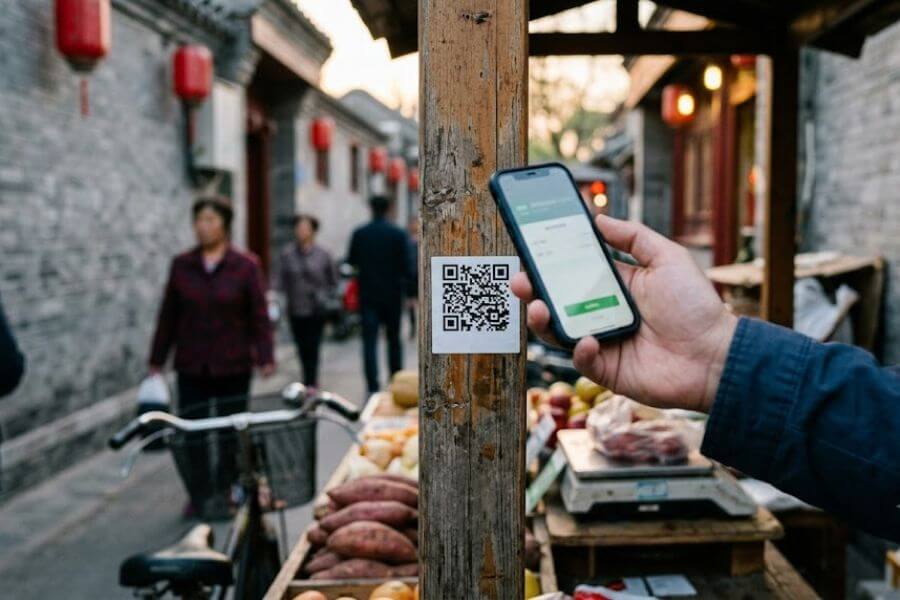
Imagine walking up to a tiny wooden cart on a side street in Beijing. The aroma of roasted sweet potatoes fills the air. You reach into your pocket, pull out a crisp banknote, and hand it to the vendor. The vendor looks at the bill, shakes their head, and points to a small plastic square with a printed barcode.
This is the reality of modern travel in China. The country did not just skip over personal checks; it largely skipped over plastic credit cards too. Instead, it jumped straight from paper cash to digital mobile payments. Today, the entire society runs on digital wallets.
For an American traveler, this can feel like stepping into a science-fiction movie. In the United States, we are used to tapping a credit card, using Apple Pay, or just handing over green bills. In China, plastic cards are mostly reserved for international hotel chains. If you try to pay for a taxi or a bowl of noodles with a standard US credit card, the card reader will likely throw an error.
Thankfully, the doors have opened wide for international visitors. In the past, you needed a Chinese bank account and a local phone number to use these mobile payment systems. Now, the two massive networks that power the country allow you to bind your American credit or debit cards directly to their platforms.
Using these apps is not just about convenience; it is about survival as a tourist. Without them, you will find yourself struggling to hail rides, order food at restaurants, or buy tickets to famous sights. By understanding how these systems work, you turn your smartphone into an all-access pass to the entire country.
Meeting the Big Two: Alipay versus WeChat Pay
When you look at how people pay for things in China, you will constantly see two names: Alipay and WeChat Pay. They are competitive rivals, much like Visa and Mastercard, or Apple and Android. While they perform the same basic function, they come from very different backgrounds and offer slightly different user experiences.
The Story of Alipay
Alipay started out as a payment service for Alibaba, which is one of the largest online shopping websites in the world. Because it began as a tool dedicated entirely to commerce, the app feels very much like a financial dashboard. It is packed with tools designed for shopping, money management, booking travel, and interacting with businesses.
For an American traveler, Alipay is often the preferred starting point. The app has a dedicated international version that simplifies the interface for foreign users. It strips away many of the complex financial features that only apply to Chinese citizens and leaves behind a clean, functional tool for making payments, translated into clear English.
The Story of WeChat Pay
WeChat Pay is built inside an app called WeChat, known as Weixin in Chinese. WeChat did not start as a shopping platform. It started as a social media and messaging app, similar to a combination of WhatsApp, Facebook, and Instagram. Because nearly every person in China uses WeChat to text their friends, call their family, and share daily updates, the payment feature was added as a natural extension of daily communication.
When you use WeChat Pay, you are using a digital wallet tucked inside your chat app. This makes it incredibly convenient if you are also using the app to communicate with local tour guides, hotel staff, or new friends you meet along the way.
Side-by-Side Comparison
To help you decide how to prepare for your journey, it helps to see how these two giants stack up against each other from the perspective of an American tourist.
| Feature | Alipay | WeChat Pay |
| Primary App Purpose | Finance, shopping, and travel tools | Messaging, social media, and chatting |
| International Setup | Very user-friendly with a dedicated foreign mode | Simple but requires navigating chat menus |
| Backup Features | High success rate with foreign credit cards | Great backup if one network experiences a glitch |
| In-App Services | Direct access to ride-hailing and bike rentals | Built-in mini-programs for restaurants and shops |
| Language Support | Excellent English translation throughout the payment side | Good English translation within the core menus |
While you can choose to use just one, the smartest strategy for an American traveler is to download and set up both apps before departing. If a specific merchant has trouble scanning your Alipay code, you can easily switch to WeChat Pay and keep your trip moving forward without a hitch.
Preparing Your Smartphone Before You Leave Home
The secret to a smooth travel experience in China is doing the heavy lifting before you step onto the airplane. Trying to download large apps, receive text message confirmation codes, and verify your identity while standing in a busy airport terminal after a twelve-hour flight is a recipe for frustration. By setting up your digital wallets in your living room in the United States, you ensure that everything is verified and ready to go.
Gathering Your Documents
Before you open the app store on your phone, gather the necessary items. Having these ready on your desk will make the sign-up process quick and simple:
- Your physical US passport
- A valid mobile phone number that can receive text messages
- The US credit cards or debit cards you plan to use on your trip
- A reliable internet connection
Choosing Your Phone Number
You can register for both apps using your current US phone number. You do not need a Chinese SIM card to create an account. Make sure your US phone plan allows you to receive international text messages while you are still at home, as both apps will send a verification code to your phone during registration.
If you plan to switch to a local Chinese SIM card or an eSIM when you arrive in China, your apps will still work. The accounts stay tied to your identity, but it is much easier to complete the initial registration with your permanent American number.
Step-by-Step Guide to Setting Up Alipay
Alipay is generally the easiest app for international tourists to configure. Follow these steps to get your account running:
Step One: Download and Register
Open the App Store on your iPhone or the Google Play Store on your Android device. Search for Alipay and download the app. Once it installs, open it up. The app will ask for your mobile phone number. Select the international country code for the United States (+1) and enter your full phone number.
Alipay will send a text message with a short code to your phone. Type that code into the app to verify that you own the number.
Step Two: Switch to the International Version
Once you log in, the app might ask if you want to use the international version. Always select yes. If it does not ask automatically, look for a toggle or a settings menu labeled International Version. This switches the interface to English and organizes the home screen so that the tools you need as a tourist are right in front of you.
Step Three: Verify Your Identity
Because Alipay handles financial transactions, Chinese regulations require users to verify who they are. Do not skip this step, as unverified accounts face strict payment limits or might get blocked entirely.
Locate the Account or Me tab at the bottom of the screen, then tap on your settings or look for Identity Verification. You will need to type in your legal name exactly as it appears on your US passport, along with your passport number.
The app will then ask to take a photo of your passport information page. Find a well-lit room, avoid glare on the glossy paper, and snap a clear picture. Finally, the app will use your phone camera to do a quick facial scan to prove you are the person in the passport. This process is automated and usually gets approved within a few minutes to a few hours.
Step Four: Link Your American Cards
Now it is time to add your money source. Go to the Bank Cards section under your profile. Tap the option to add a new card.
You can use the camera to scan your card or type the numbers manually. Fill in the expiration date, the security code on the back, and your US billing address. You can add multiple cards here. It is smart to add at least two different cards, such as a Visa and a Mastercard, just in case your bank blocks a transaction later on.
Step-by-Step Guide to Setting Up WeChat Pay
WeChat requires a tiny bit more patience because the payment system lives inside a massive communication app.
Step One: Install WeChat and Create an Account
Go to your app store, search for WeChat, and download it. Open the app and choose the option to sign up via mobile number. Just like before, select the United States (+1) code and enter your number. Create a secure password.
WeChat will guide you through a safety check, which often involves a puzzle piece slide on your screen. You will receive a verification code via text message to complete the setup.
Step Two: Locate the Wallet Feature
Once you are inside the main chat interface, look for the Me tab at the bottom right corner. Tap on the section labeled Services or Money. If you do not see these options right away, it is because WeChat sometimes hides the payment feature for international numbers until you try to activate it.
If it is hidden, you can activate it by having a friend send a tiny digital payment to your chat, or by looking for the WeChat Pay search bar at the top of the app to trigger the setup menus.
Step Three: Enter Card Details and Verify Identity
When you open the financial section, tap on Cards and select Add a Card. WeChat will ask you to create a six-digit payment PIN. This is a special password you will type in when buying things, so pick numbers you will remember easily.
Type in your American credit card number. The app will automatically recognize the card type and bring up an identity verification form. Fill out your passport information carefully. Just like Alipay, WeChat may request a photo of your passport to finish the safety checks. Once submitted, your card is bound to your account.
How Transactions Work in Real Life
Once you arrive in China, you will see people paying for things everywhere you go. The process is fast, but it can look confusing at first. There are two primary ways that a digital payment happens in a store or restaurant.
Method One: The Merchant Scans Your Code
This is the most common method in major supermarkets, clothing stores, fast-food chains, and subway stations.
- Open your chosen app (Alipay or WeChat).
- Tap the button at the top of the screen that says Pay or Pay/Receive.
- A screen will appear showing a large barcode and a square QR code.
- Hold your phone out toward the cashier or their electronic scanning device.
- The machine will beep, the app will process the transaction, and a receipt screen will appear showing how much money was deducted.
Method Two: You Scan the Merchant’s Code
This method is incredibly common at small fruit stalls, street-food vendors, small boutique shops, and inside taxicabs. Instead of a high-tech electronic scanner, the merchant will have a printed piece of paper or a small plastic stand with their personal QR code displayed.
- Open your payment app.
- Tap the button that says Scan.
- Your phone camera will open inside the app. Point your camera at the merchant’s printed code.
- The app will open a prompt asking you to type in the amount of money you owe in Chinese Yuan.
- Look at the cash register or ask the vendor for the total amount, type it into your phone, and hit the confirm button.
- Type in your six-digit payment PIN or use your phone’s fingerprint or face recognition to authorize the transfer.
- Show the success screen on your phone to the merchant so they know the money went through.
Managing Transaction Fees and Exchange Rates
Using an international credit card in China involves navigating currency exchanges. Understanding how the math works will help you avoid unexpected surprises on your monthly credit card statements back home.
The App Transaction Fee
Both Alipay and WeChat Pay have an agreement with international card companies regarding transaction fees. For small purchases, the apps do not charge you anything extra to use your American card.
- Purchases under 200 Chinese Yuan: There is zero platform fee. If your meal costs 50 Yuan, you pay exactly 50 Yuan.
- Purchases of 200 Chinese Yuan or more: Both apps add a three-percent fee to the total cost. This fee covers the complex processing required to move money across international borders.
If you are buying an expensive item, like a high-end camera or booking a luxury hotel stay that costs 1000 Yuan, the app will automatically calculate that three-percent fee and show it to you before you swipe to confirm the payment.
Credit Card Foreign Transaction Fees
The three-percent fee from the app is completely separate from any fees your American bank might charge. Many standard credit cards carry a foreign transaction fee, which is often around three percent of the total purchase price.
If you use a card with these fees, you could end up paying a double fee on larger purchases. To prevent this, try to link a US credit card that specifically offers No Foreign Transaction Fees as a benefit. Many travel-focused credit cards offer this feature, which can save you a significant amount of money over a long trip.
Understanding the Exchange Rate
When you make a purchase, the price is shown in Chinese Yuan, which is also called Renminbi. The app passes this request to your credit card company, which converts the amount into US Dollars based on the current international exchange rate.
Because exchange rates fluctuate slightly every day, you might see small variations in how much a specific item costs in American dollars from one week to the next.
Navigating Built-In Services and Mini-Programs
One of the most powerful features of both Alipay and WeChat is that they are much more than just digital wallets. They are ecosystems that host thousands of tiny applications called mini-programs. For an American tourist, these built-in tools are incredibly helpful because they allow you to navigate daily life without downloading dozens of separate apps.
Riding the Subway and City Buses
Instead of standing in a long line at a station kiosk to buy a single paper subway ticket with cash every time you want to travel, you can use your payment app to clear the turnstiles.
Inside Alipay, look for a feature called Transport or Travel. You can activate a digital transit card for the specific city you are visiting, such as Shanghai, Beijing, or Shenzhen. The app will generate a unique transit QR code. When you walk into the subway station, simply tap this code against the glass reader on top of the turnstile. The gate opens instantly, and your connected American card is charged for the exact cost of the ride when you exit at your destination.
Hailing a Taxi or Private Car
Getting around by car is remarkably simple thanks to ride-hailing services. The most popular network in China is Didi, which works just like Uber or Lyft.
You do not need to download a separate Didi app. You can find the Didi mini-program directly inside the search bar of Alipay or WeChat. The interface automatically translates into English. You type in your destination, see the price estimate, choose your car type, and request a driver. The ride is tracked on a map, and the payment is handled automatically through your linked American card when the trip finishes.
Ordering Food at Restaurants
When you walk into a casual restaurant in China, you will rarely see a physical paper menu. Instead, you will see a small square sticker stuck to the corner of your dining table.
To order your food, you open your app and scan that sticker. A digital menu will pop up on your phone screen. Many of these menus include helpful pictures of every dish, making it easy to see what you are getting even if you cannot read the Chinese characters. You add the items to your cart, submit the order to the kitchen, and pay directly through the interface. The kitchen staff brings the food straight to your table number without you ever needing to flag down a waiter.
Overcoming Common Hurdles and Glitches
Even with perfect preparation, you might occasionally run into a technical snag while traveling. Knowing how to handle these moments will keep you calm and collected.
Bank Fraud Alerts
The most common issue American travelers face is not a failure of the Chinese apps, but rather their own bank back home stepping in to block a transaction. When an automated security system at a US bank suddenly sees a charge coming from a small grocery store in Chengdu, it might flag it as potential identity theft and temporarily freeze your card.
To avoid this, log into your US bank account before you leave and submit a travel notice. Let them know the dates you will be in China. If a card still gets declined while you are abroad, open your bank’s mobile app to check for an alert, or switch to your backup credit card inside Alipay or WeChat.
Internet Connection Issues
Mobile wallets require data to work. If you step into a basement shop where there is no cellular service, or if your international data roaming pauses, your app might have trouble loading your payment code.
Fortunately, both Alipay and WeChat are designed to handle brief connection drops. The main payment barcodes can often be generated offline for a short period. However, to stay safe, always ensure your phone has a reliable connection. Purchasing an eSIM with a generous data package before you arrive, or connecting to secure hotel wireless networks, will prevent payment interruptions.
The Merchant’s Phone Cannot Scan Your Screen
Every once in a while, a cashier might try to scan your phone code, and their machine will emit an error beep. This often happens if your phone screen is too dim or covered in smudges. Turn your screen brightness all the way up to maximum and wipe your screen clean before trying again.
If the error persists, it might mean that the merchant’s store system is older and cannot process codes linked to international cards. If this happens, ask if they can switch methods. If they tried to scan your phone, ask if you can scan their static printed QR code instead, or vice versa.
Essential Safety Tips for Digital Payments
Using digital wallets is incredibly safe, but just like carrying a leather wallet in your back pocket, you need to practice good digital hygiene to protect your funds.
Protect Your Access Codes
Your payment codes are essentially keys to your bank account. Never take a screenshot of your payment barcode and send it to someone else over a chat message. Anyone who possesses that image can scan it and deduct money from your account.
Secure Your Phone Hardware
Make sure your smartphone requires a passcode, fingerprint, or facial recognition to unlock. Inside both Alipay and WeChat, go into the security settings and turn on the feature that requires a password or biometric scan before a payment code can be displayed. This ensures that if your phone accidentally slips out of your pocket on a bus, a stranger cannot use it to buy things.
Verify the Names on Static Codes
When you scan a printed paper QR code at a small market stall, the app will usually display a shortened version of the merchant’s name before you type in your PIN. Take a quick glance at the vendor’s stall sign to make sure the names match up. This ensures you are sending the money to the correct person and not to a neighboring stall.
Packing a Backup Plan
While the digital ecosystem in China is incredibly advanced, relying one hundred percent on a single piece of technology is never a wise travel strategy. Smartphones can run out of battery, screens can crack, and networks can occasionally go down for maintenance.
Carrying Emergency Paper Cash
Even though local residents rarely use it, Chinese Renminbi banknotes remain legal tender. Major banks, upscale hotels, and large transportation hubs are required by law to accept cash.
When you arrive at the airport in China, visit an automated teller machine (ATM) and withdraw a small amount of paper cash using your American debit card. Keep these bills tucked away in a secure pocket of your daypack. If you ever find yourself with a dead phone battery late at night, you can use that cash to pay for a taxi ride back to your hotel.
Keeping Your Phone Charged
Because your entire day relies on your phone, a portable battery bank is an absolute necessity. Buy a high-quality, lightweight external battery pack and carry it with you in your pocket or bag whenever you leave your hotel room.
When buying a portable battery pack, check the labels printed on the side of the device. Chinese airport security rules are very strict about power banks. The battery capacity must be clearly printed on the plastic housing and must be under 100 watt-hours (which is roughly 27,000 milliamp-hours) to be allowed on a commercial airplane. If the label is rubbed off or missing, security agents at the airport will confiscate it.
Frequently Asked Questions
Can I link an American debit card instead of a credit card to these apps?
Yes, you can link a US debit card that is backed by Visa or Mastercard. The setup process is identical to adding a credit card. However, using a credit card is generally recommended for travel. Credit cards offer stronger fraud protection and do not pull funds directly out of your checking account while a transaction is being processed across borders.
Do I need a Chinese phone number to use Alipay or WeChat Pay?
No, you do not need a Chinese phone number. You can successfully register, verify your passport identity, and link your American bank cards using your current US phone number. The apps work perfectly fine with international numbers as long as you can receive the initial confirmation text messages during setup.
What should I do if a vendor refuses to accept my digital payment code?
If your code is declined, it is usually because the vendor’s specific payment terminal is not set up to handle foreign credit cards. If this happens, try switching to the other app. If Alipay fails, try WeChat Pay. If both fail, offer to scan their printed QR code instead of having them scan your screen. If all digital options fail, pull out your backup paper cash to settle the bill.
Is it safe to upload a photo of my passport into these apps?
Yes, it is standard practice. Chinese financial and cybersecurity regulations require identity verification for anyone using mobile payment networks. Both platforms use advanced encryption to protect your documentation. Millions of international travelers and expats safely upload their details every year to comply with these laws and unlock mobile payment privileges.
Can I use these apps to send money directly to friends or tour guides?
As an international user with an American credit card, you can easily pay businesses, restaurants, taxis, and shops. However, the ability to send personal peer-to-peer transfers (like sending a gift of money directly to a friend’s personal chat window) is often restricted for foreign cards due to international banking regulations. For businesses and official tour companies, you can simply scan their business merchant code to pay them without an issue.
Will these payment apps work if I am using a virtual private network on my phone?
Yes, both apps generally continue to function normally even if you have a virtual private network active on your smartphone to access blocked western websites. However, if you notice the payment screens loading slowly or throwing a connection error, you can temporarily pause your secure connection for a brief minute while you complete your transaction at the cash register.